TwinCAT Library and ST

THIS  will be updated soon


How to update or install libraries

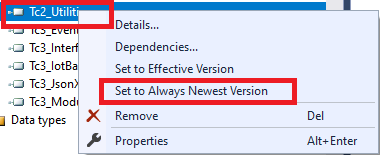
If we have multiple versions installed  then we can update Newest version by the following way.

Figure 01: Using the preferred library in the system

Depending on whether the References object is selected in the PLC project tree or a single library, the command sets all placeholders and libraries available in the project or the selected library or placeholder to “Always newest” version (“*”). This means that TwinCAT always uses the latest version of the corresponding library found in the library repository.

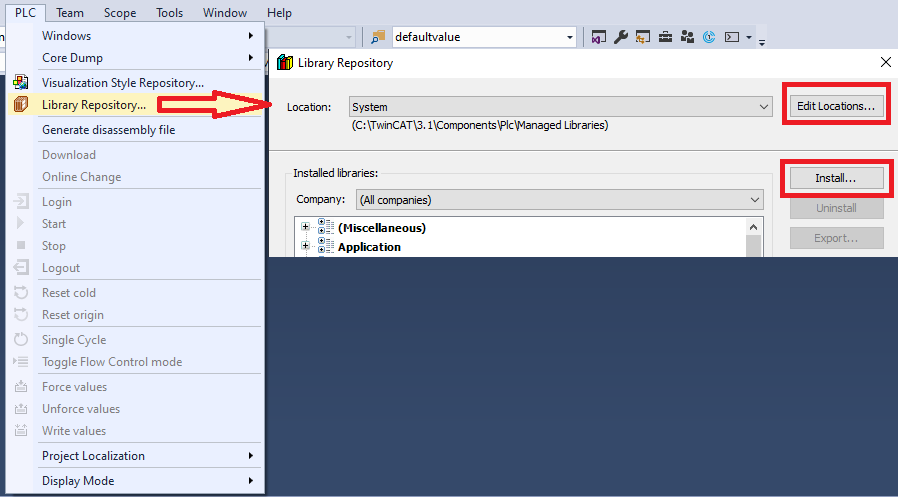
Installing the new version :

Select PLC | Library Repository | Edit Locations | Install

As shown in the following screenshot

Figure 02: Installing a new library in the TwinCAT environment

Tips

=> EC_DEVICE_STATE_OP (defined as 8) in the TwinCAT PLC EtherCAT Library ( Tc2_EtherCAT) Internal library. If you need that definition, you need to include the library ( Tc2_EtherCAT)

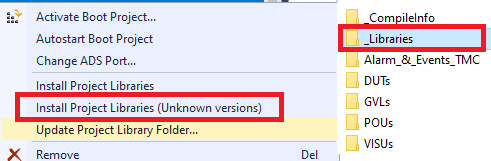
=> Importing libraries to a new PC. You have copied a project to a new PC, and the libraries used are not installed yet. When we copy a project, the _Libraries folder (where we have all the libraries) is copied. We need to press on the project and select Install Project Library (unknown versions), as shown on the Beckhoff site.

Figure 03: Importing all libraries to a new PC from a ported project

References

Download the sample from the link given above.

Next, let’s try to understand TwinCAT Software testing: https://www.hemelix.com/plc/twincat-software-testing/

Ask questions related to the Hemelix sample code and design on the Google group https://groups.google.com/g/hemelix