TwinCAT Software Project Compare
When we develop software, we change the software in a controlled way, and sometimes it can go in an uncontrolled way. There are different reasons why we need to compare; in this article, we shall describe and continue the discussion.
In this article, we shall describe how we can compare the project and how we can fix the project.
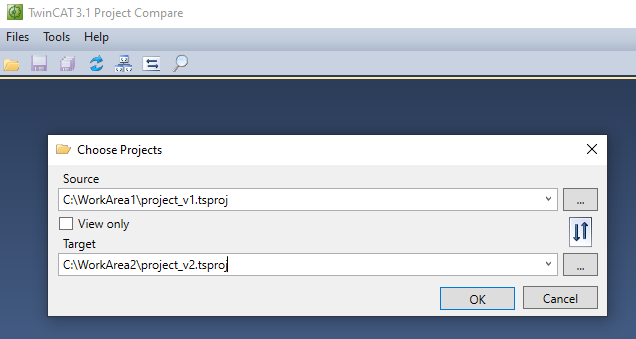
Source: Original project (upper project), from the source data can be copied to the Target, the source will be on the right side when we compare.
Target: Modified project (lower project), can be updated by using Accept Single, Accept Block, etc
Figure 01: Project selection for comparison purposes
=> Press OK, and it will start comparing the code, finally showing the differences.
=> Source project (project_v1.tsproj) will be on the right side of the comparison window, from where we can copy content to the left project.
=> We can switch comparison files by switching files (Files | Choose Files)
What should we do with a different project hierarchy
Many times, we compare the projects that may have different project names. This tip will help in that case: select the set equal to option and set it equal to the other side. Click on the project hierarchy to get this option.
Compare Project from Target
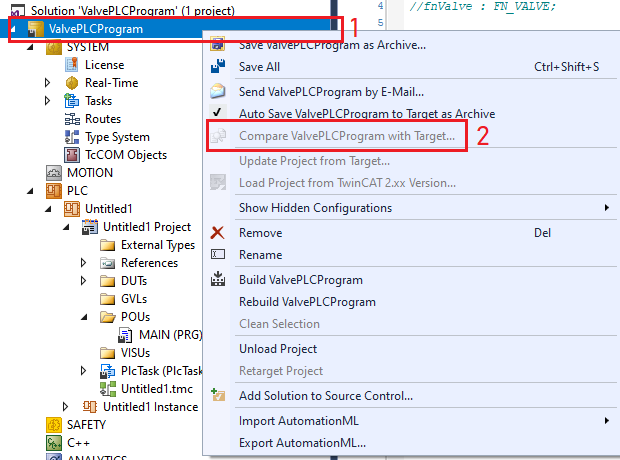
We can have a situation we are given a PLC (device) and a software project. The situation can be we may not be sure what version of the SW is running. We can compare the current project with the project running in the Target. The following image describes the steps.
Figure 02: Project comparison from the target PLC
References:
What Next:
Download the sample from the link given above.
Next, let’s try to understand BSD data https://www.hemelix.com/plc/twincat-and-bsd/
Ask questions related to Hemelix sample code and design at Google group https://groups.google.com/g/hemelix