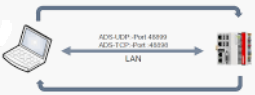
Communication over ADS with ST
Beckhoff ADS (Automation Device Specification) is the native communication protocol of TwinCAT . It allows TwinCAT PLCs and external applications to exchange data over a network.
A common use case is communication between two or more Beckhoff PLCs. For example, if the control programs of PLC 1 and PLC 2 are written in Structured Text (ST), ADS can be used to exchange process values, commands, status information, alarms, and other PLC variables.
PLC 1 (ST) ⇄ ADS ⇄ PLC 2 (ST)
The ST program can use TwinCAT ADS communication function blocks to read or write data in another PLC. Each TwinCAT device is identified using its AMS Net ID, allowing communication between PLCs across an Ethernet network.
ADS can also connect PLCs to higher-level applications:
PLC (ST) ⇄ ADS ⇄ C# Application
Using Beckhoff’s TwinCAT.Ads library, a C# application can read and write PLC variables and receive data-change notifications.
ADS is particularly useful in multi-PLC systems, machine-to-machine communication, Edge applications, testing tools, and custom monitoring systems because it provides direct and native communication within the TwinCAT ecosystem.
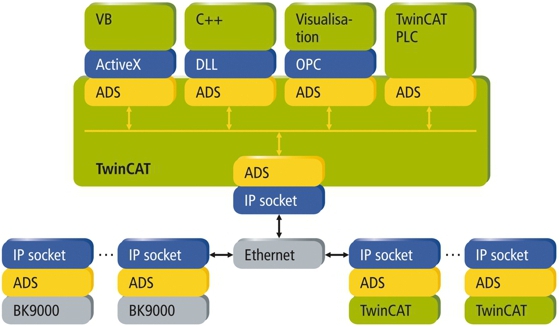
Figure 01: ADS protocol, a big picture
Sample 1: Communication between 2 PLCs
Two PLCs, PLC A and PLC B, exchange data with each other once per minute. Each PLC has its own data structure for sending information to the other PLC. PLC A sends an ‘A_To_B’ structure to PLC B, and PLC B stores the received data in a local variable. PLC B also sends a ‘B_To_A’ structure to PLC A, and PLC A stores that received data locally.
The communication is controlled by a one-minute ‘TON’ timer in each PLC program. A send action only happens when the related send command is enabled, such as ‘sendToB’ in PLC A or ‘sendToA’ in PLC B. These command variables can be set by an HMI or another part of the control program.
The example uses TwinCAT TCP/IP socket communication. One direction uses TCP port ‘5000’ for data from PLC A to PLC B, and the other direction uses TCP port ‘5001’ for data from PLC B to PLC A. Each sender connects to the receiver’s IP address, sends the packed structure as bytes, and then reports busy, done, or error status.
Each receiver opens a TCP listener on its local IP address and port, accepts an incoming connection, and cyclically checks for received data. When the expected number of bytes is received, the data is copied into the local receive structure.
The send and receive logic is organized with enum-based state machines instead of numeric states. This makes the program easier to read and maintain, using states such as ‘Idle’, ‘Connect’, ‘Send’, ‘StartListen’, ‘WaitForClient’, and ‘ReceiveData’.
Download and try
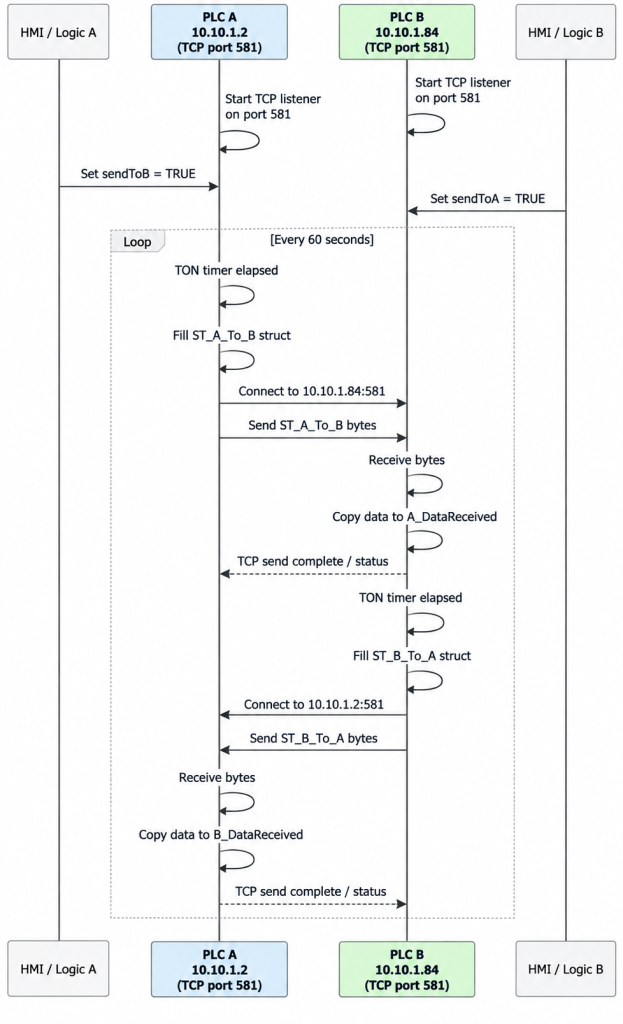
Figure 02: ADS communication between PLC A and PLC B
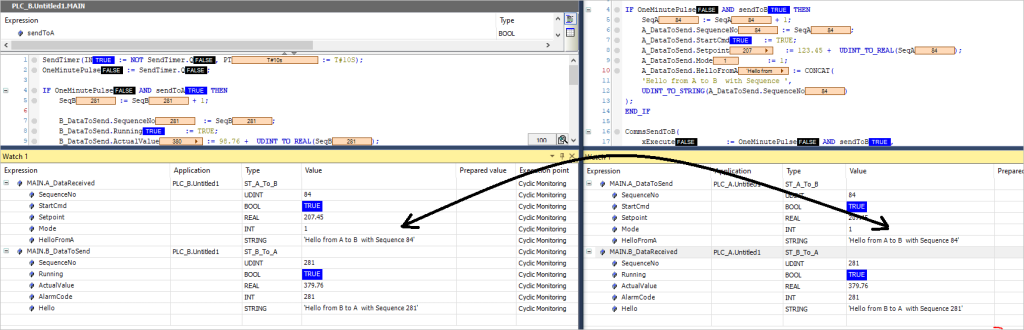
Figure 03: PLC A send message to B and vice versa
Function block for Sending data
FUNCTION_BLOCK FB_AdsSend_B_To_A
//Header
VAR_INPUT
    xExecute       : BOOL;
    sRemoteNetId   : T_AmsNetId;
    nRemoteAdsPort : T_AmsPort := 851;
    sRemoteSymbol  : STRING(80);
    stData         : ST_B_To_A;
END_VAR
VAR_OUTPUT
    xBusy  : BOOL;
    xDone  : BOOL;
    xError : BOOL;
    nErrId : UDINT;
END_VAR
VAR
    fbTrig          : R_TRIG;
    fbGetHandle     : ADSRDWRT;
    fbWriteValue    : ADSWRITE;
    fbReleaseHandle : ADSWRITE;
    eState          : E_AdsWriteState := E_AdsWriteState.Idle;
    stTxBuffer      : ST_B_To_A;
    nSymbolHandle   : UDINT;
    xGetHandle      : BOOL;
    xWriteValue     : BOOL;
    xReleaseHandle  : BOOL;
    bGetBusy        : BOOL;
    bGetErr         : BOOL;
    nGetErrId       : UDINT;
    bWriteBusy      : BOOL;
    bWriteErr       : BOOL;
    nWriteErrId     : UDINT;
    bReleaseBusy    : BOOL;
    bReleaseErr     : BOOL;
    nReleaseErrId   : UDINT;
END_VAR
//Implemetation
fbTrig(CLK := xExecute);
xDone := FALSE;
xError := FALSE;
nErrId := 0;
CASE eState OF
    E_AdsWriteState.Idle:
        xBusy := FALSE;
        xGetHandle := FALSE;
        xWriteValue := FALSE;
        xReleaseHandle := FALSE;
        IF fbTrig.Q THEN
            stTxBuffer := stData;
            xBusy := TRUE;
            eState := E_AdsWriteState.StartGetHandle;
        END_IF
    E_AdsWriteState.StartGetHandle:
        xBusy := TRUE;
        xGetHandle := TRUE;
        eState := E_AdsWriteState.WaitGetHandle;
    E_AdsWriteState.WaitGetHandle:
        xGetHandle := FALSE;
        xBusy := TRUE;
        IF NOT bGetBusy THEN
            IF bGetErr THEN
                xError := TRUE;
                nErrId := nGetErrId;
                eState := E_AdsWriteState.Idle;
            ELSE
                eState := E_AdsWriteState.StartWriteValue;
            END_IF
        END_IF
    E_AdsWriteState.StartWriteValue:
        xBusy := TRUE;
        xWriteValue := TRUE;
        eState := E_AdsWriteState.WaitWriteValue;
    E_AdsWriteState.WaitWriteValue:
        xWriteValue := FALSE;
        xBusy := TRUE;
        IF NOT bWriteBusy THEN
            IF bWriteErr THEN
                xError := TRUE;
                nErrId := nWriteErrId;
            ELSE
                xDone := TRUE;
            END_IF
            eState := E_AdsWriteState.StartReleaseHandle;
        END_IF
    E_AdsWriteState.StartReleaseHandle:
        xBusy := TRUE;
        xReleaseHandle := TRUE;
        eState := E_AdsWriteState.WaitReleaseHandle;
    E_AdsWriteState.WaitReleaseHandle:
        xReleaseHandle := FALSE;
        xBusy := TRUE;
        IF NOT bReleaseBusy THEN
            IF bReleaseErr AND NOT xError THEN
                xError := TRUE;
                nErrId := nReleaseErrId;
            END_IF
            eState := E_AdsWriteState.Idle;
        END_IF
END_CASE
fbGetHandle(
    NETID    := sRemoteNetId,
    PORT     := nRemoteAdsPort,
    IDXGRP   := 16#F003,
    IDXOFFS  := 0,
    WRITELEN := TO_UDINT(LEN(sRemoteSymbol) + 1),
    READLEN  := SIZEOF(nSymbolHandle),
    SRCADDR  := ADR(sRemoteSymbol),
    DESTADDR := ADR(nSymbolHandle),
    WRTRD    := xGetHandle,
    TMOUT    := T#5s,
    BUSY     => bGetBusy,
    ERR      => bGetErr,
    ERRID    => nGetErrId
);
fbWriteValue(
    NETID   := sRemoteNetId,
    PORT    := nRemoteAdsPort,
    IDXGRP  := 16#F005,
    IDXOFFS := nSymbolHandle,
    LEN     := SIZEOF(stTxBuffer),
    SRCADDR := ADR(stTxBuffer),
    WRITE   := xWriteValue,
    TMOUT   := T#5s,
    BUSY    => bWriteBusy,
    ERR     => bWriteErr,
    ERRID   => nWriteErrId
);
fbReleaseHandle(
    NETID   := sRemoteNetId,
    PORT    := nRemoteAdsPort,
    IDXGRP  := 16#F006,
    IDXOFFS := 0,
    LEN     := SIZEOF(nSymbolHandle),
    SRCADDR := ADR(nSymbolHandle),
    WRITE   := xReleaseHandle,
    TMOUT   := T#5s,
    BUSY    => bReleaseBusy,
    ERR     => bReleaseErr,
    ERRID   => nReleaseErrId
);
Download the sample
=> We need to add the route to the PLC so it can find for communicating over ADS
=> We need to set sendToA to TRUE
Software interfaces
ADS-OCX
The ADS-OCX is an Active-X component. It offers a standard interface to, for instance, Visual Basic, Delphi, etc.
ADS-DLL
You can link the ADS-DLL (DLL: Dynamic Link Library) into your C program.
OPC
The OPC interface is a standardized interface for communication used in automation technology. Beckhoff offer an OPC server for this purpose.
Protocol
The ADS functions provide a method for accessing the Bus Coupler information directly from the PC. ADS function blocks can be used in TwinCAT for this. The function blocks are contained in the Tc2_System.lib library. It is also equally possible to call the ADS functions from AdsOCX, ADSDLL or OPC.
AMSNetID
The AMSNetID provides a reference to the device that is to be addressed. This is taken from the MAC address of the first Ethernet port (X001) and is printed on the side of the CX80xx. For the AMSNetID the bytes 3..6 plus “.1.1” are typically used.
Example:
MAC address 00-01-05-01-02-03
AMSNetID 5.1.2.3.1.1
Port number
The port number distinguishes sub-elements in the connected device.
Port 851: local process data PLC runtime 1
Index group
The index group distinguishes different data within a port.
Index offset
Indicates the offset, from which reading or writing the byte is to start.
Len
Gives the length of the data, in bytes, that is to be read or written.
TCP port number
The TCP port number for the ADS protocol is 48898 or 0xBF02.
Tips
Tips 01:
Windows data type and size are different in TwinCAT structured text. This causes problems, especially when we write data over ADS in C#. Here is an example, we have declared a variable in the Windows program as the following
int myWinInt = 200;
object rawValue = myWinInt ;
client.WriteAny(handle, rawValue); // This will throw an exception “parameter size not correct” if the variable in PLC is declared as INT type.
myPLCIntType : INT := 0; //Declared in PLC
Solution:
Make sure the data size in PLC is equal to or higher than the size of the Windows variable, the above case can be solved in the following way.
int myWinInt = 200; // 4 bytes in Windows
myPLCIntType : DINT := 0; // 4 bytes in PLC
OR
short myWinInt = 200; // 2 bytes in Windows
myPLCIntType : INT := 0; // 2 bytes in PLC