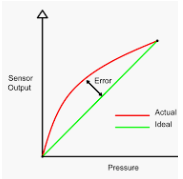
Sensors One and Two Point calibration
A sensor is a device that measures or senses a number of physical properties and converts it into another analog quantity that can be measured electrically, such as voltage, current, etc.
A transducer is a device that is connected to a sensor so as to convert the measured values into standard analog electrical signals, such as 4 to 20 mA. The output can be used directly by the system controller.
A transmitter is called to the combined package sensor and transducer. Some people use these terms interchangeably, though it is not correct.
A pressure sensor is a device for measuring the pressure of gases or liquids. Pressure is an expression of the force required to stop a fluid from expanding and is usually stated in terms of force per unit area. A pressure sensor usually acts as a transducer; it generates a signal as a function of the pressure imposed.
The 4-20 mA current loop is the prevailing process control signal in many industries. It is an ideal method of transferring process information because the current does not change as it travels from the transmitter to the receiver. Since 4 mA is equal to 0% output, it is incredibly simple to detect a fault in the system.
Accuracy refers to how close measurements are to the “true” value, while precision refers to how close measurements are to each other. Accuracy describes the difference between the measurement and the part’s actual value and precision describes the variation we see when we measure the same part repeatedly with the same device.
Precision can be broken down further into two components: Repeatability, the variation observed when the same operator measures the same part repeatedly with the same device. Reproducibility: The variation observed when different operators measure the same part using the same device.
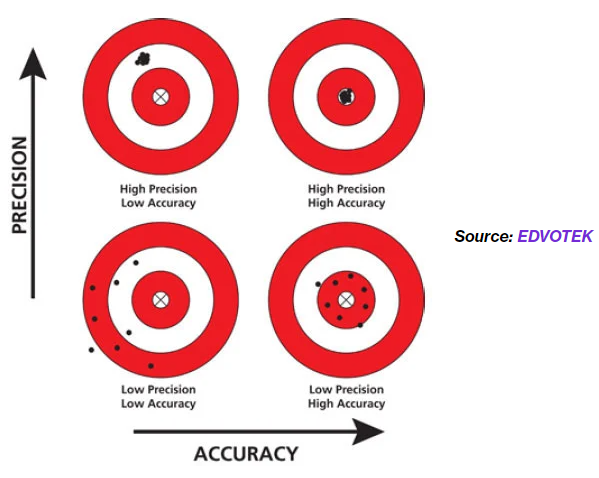
Figure 1: Differences between accuracy and precision
How data is read by controller:
We shall take a pressure sensor as our example to describe the process. The actual data is generated by the sensor. Pressure value mechanical deflection of a diaphragm, which is converted to electrical energy by a strain gauge (the diaphragm and strain gauge constitute a transducer), then to a numeric integer value by an input-output module of the controller.
The value can be stored somewhere from where our application reads the raw value. We have some reading for 3 similar pressure transmitters. Ideally, when the current measurement is 4 milliamperes, then the raw register reading should be 0 (ideal case). Since real-world objects are away from the ideal situations due to different reasons, we need calibration. The sensor might behave or give different values at different conditions, such as varying temperatures.
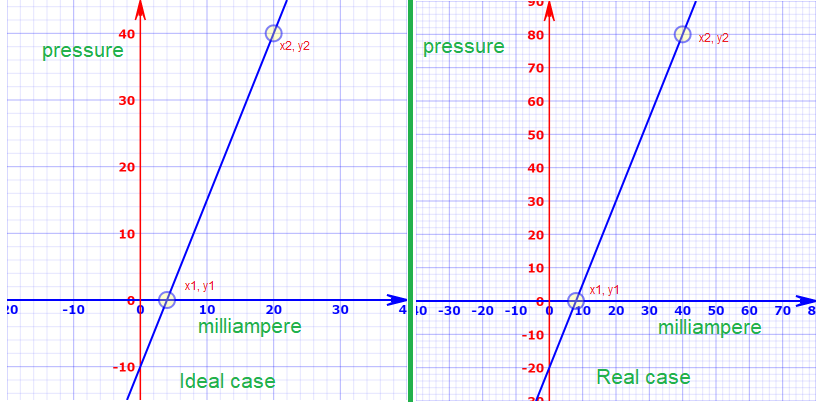
Figure 2: Ideal measurement, real measurement, and register values corresponds to 4 to 20 m amp (note the scale is different for both plot)
The above two images describe lots of the basics. In the left image, we have an ideal case, and on the right side, we have a real case (as an example). We have an error in the sensor. It always shows a lower pressure value than the value corresponding to the electrical signal.
On the left side, at 20 milliamps current, the pressure value is 40 bar (for example), but on the right side, at 20 milliamps, we see 30 bar. The slope of both curves is the same with a value of 2.5 (note see the scale is different for each curve).
For example, on the left side, in the sensor, we have a current of 10 milliamps, and the sensor reading should be 15, but we are getting 5 (according to the picture on the right side)
For the ideal case, we can calculate the pressure value based on the following formula.
y = mx + c, where c is the intersection between point (0,0) and the y-axis of the line. We can see that the line has crossed the y-axis at 0, -10. So the value of c is -10.
Exactly, in the same way, we can calculate the value of the pressure value based on the same formula, but the intersection is in this case, -20.
So we can calculate the value of pressure value based on the measured current value.
In both cases, we can find the pressure value if we know the current value. The Beckhoff analog measurement card gives us an integer number corresponding to 4 mA and 20 mA. We can use the number directly.
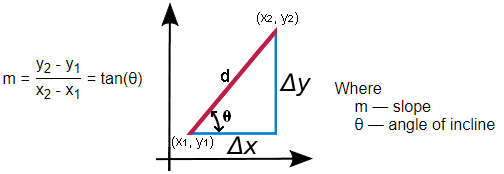
Figure 4: meaning of slope on the XY plane which is actually tangent of the angle to X axis
Let’s say with a 4 milliamp value of the current, we get an AD converted value of 0, and at 20 milliamps, we get the AD converted value around 40. We can determine any pressure value corresponding to the AD converted value by using the formula y = mx + c in an ideal case.
If we know the value of x and c, then for any value of x (any value between 4 to 20), we can find the corresponding value of y (y-axis value or pressure value). m is nothing but tan θ, where θ is the angle between the ideal line and the x-axis. m can be calculated by using the following formula, where y2 is the maximum value of the y-axis (40), y1 is the minimum value of the y-axis (0), x2 is the maximum value of the x-axis (20), and x1 is the minimum value of the x-axis (4).
if we use the values, m = (40-0)/(20-4) = 2.5
Final formula is: y = 2.5x-10
In the above equations, y is the pressure value and x is the milliamps value. For each milliamp value, we can find the pressure value.
Sensor calibration
If our sensors and other devices work perfectly, then we don’t need calibration, as in Figure 4 we have an ideal case. For example, at this moment somewhere, the actual pressure is 0 mbar, but our pressure sensor is giving us 2 mbar. In another situation, same place, we increased the actual pressure to 10 mbar, and our pressure sensor gives us 12 mbar. Clearly, our pressure sensor gives a wrong value. We can compensate for this error by calibration. The situation can be described graphically by the following graph. It has a constant offset from the ideal value. Since there is a constant offset throughout the measurement range, we can compensate for it by one-point calibration.

Figure 3: Actual measured data and ideal response (one point calibration)
One-Point Calibration
To perform a one-point calibration:
=> Take a measurement with your sensor.
=> Compare that measurement with your reference standard.
=> Subtract the sensor reading from the reference reading to get the offset.
=> Save the offset to the persistent area of your PLC
=> In your code, add the offset to every sensor reading to obtain the calibrated value.
This is called one-point calibration since a single measurement from any point in the operating range will be enough to compensate for the error.
Example:
A temperature probe reads 22.7°C but the true temperature is 25.0°C
RawValue = 22.7, and ReferenceValue = 25.0
Offset = ReferenceValue – RawValue = 25.0-22.7 = 2.3
The corrected reading formula
CorrectedValue = RawValue + Offset
So if the sensor later reads 30.1°C:
CorrectedValue = 30.1 + 2.3 = 32.4 ∘C
CorrectedValue=30.1+2.3=32.4 ∘C
The Mathematical model
We know the famous formula from algebra, y = mx + c
where m = slope, a = offset.
One-point calibration assumption: the slope m is considered correct (known).
We only need to determine c using a single calibration measurement. see Figure 3.0
Because the calibration point lies on the true calibration line, it must satisfy the model:
ycal=mxcal+c, where
xcal = raw reading at calibration, and
ycal = known true/reference value. The equation must be true for the measurement point.
It can adjust the offset c, because we assume the slope is already correct
=> either from the sensor datasheet
=> or from previous calibration (or if we measure the actual value by 2-point calibration)
=> or we assume ideal slope = 1 (most common)
So we treat c as a constant.
At calibration point, c = ycal – xcal (c can be a +ve or -ve value), c (offset) can be used in the formula CorrectedValue = RawValue + Offset
Slope Compensation (two-point calibration):
For a constant offset (Figure 3), we have seen that we can add or subtract a value from the real measurement, and we get the compensated value. That is a bit easy process to use. But what happens when the actual curve has a different slope than the ideal one? It has deviated from the ideal one, see the following figure. If we calculate the offset at the beginning of the operating range, as compared to that at the end of the operating range are completely different. So the single-point calibration will not be valid at all. So we need two-point calibration to compensate for this type of error (slope error).
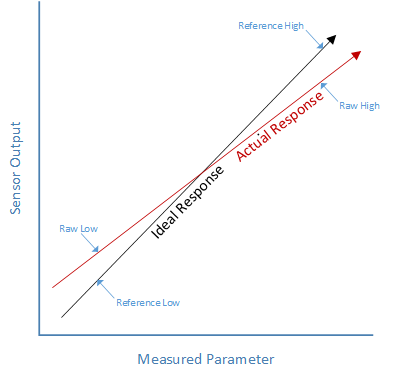
Figure 4: Ideal line is not parallel to the real line, m is not same and at the same time the offset value is different (ref 1)
As we see in Figure 4, the same technique (one-point calibration) will not work. We need to find a generic solution that works in these cases.
Concept of Two-Point Calibration
=> Two-point calibration corrects sensor readings using two known reference points.
=> We assume the relationship between the raw sensor output and the true value is linear and follows the famous algebraic equation:
=> CorrectedValue = m × RawValue + c (y =mx + c in some books)
=> If we know the values of m and c, then we can get the corrected values for each point.
=> We find a new line which will have slope m and offset c
=> We can draw any line on the XY plane if we know the coordinates of two points (by joining them), such as AB, CD, etc, as shown in the following image.
=> In 2-point calibration, we do measurements at the lower point and at the higher point of the operating range.

Figure 5: We can have a line if we connect two points, we can find the slope by using formula in Figure 4
=> We do two measurements, one at a lower side and one at a higher side of the operating range.
(RawLow, ReferenceLow), Point 1 (at the lower side) as shown in Figure 4
(RawHigh, ReferenceHigh), Point 2 (at the higher side) as shown in Figure 4
=> These points must lie on the same calibration line where we need to find the value of m and c (it means we need a third line which will have a slope m and offset c, we have 2 variables to solve by using 2 equations), Figure 6 shows the target line which we are looking for.
At the low point: ReferenceLow = m × RawLow + c (equation 1)
At the high point: ReferenceHigh = m × RawHigh + c (equation 2)
RawLow => reading of the actual pressure sensor at the lower side.
ReferenceLow => reading of the ideal pressure sensor at the lower side.
RawHigh => reading of the actual pressure sensor at the higher side.
ReferenceHigh => reading of the ideal pressure sensor at the higher side.
These points must lie on the same calibration line where we need to find the value of m and c (right side image below)
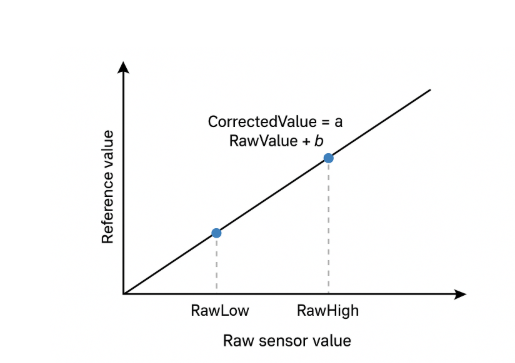
Figure 6: References Value VS Raw sensor value
We have two known calibration points:
| Raw Reading | True (Reference) Value |
|---|---|
| RawLow | ReferenceLow |
| RawHigh | ReferenceHigh |
If we subtract equation 1 from equation 2, we can find the value of m as shown below

This is the slope of the calibration line.

Now we know the value of a from our calibration data, substitute m into one of the equations:
c = ReferenceLow – m × RawLow
Now we can find the value of c by substituting m into equations 1 or 2, and find the corrected value:
CorrectedValue = ((RawValue – RawLow) * ((ReferenceHigh−ReferenceLow)/(RawHigh−RawLow)) + ReferenceLow
By this equation, we can calculate actual values for each point:
double CorrectedValue;
double RawValue = 16000 ;
double RawLow = 6000;
double RawHigh = 28000;
double ReferenceLow = 8000;
double ReferenceHigh = 29000;
double RawRange = RawHigh – RawLow;
double ReferenceRange = ReferenceHigh – ReferenceLow;
CorrectedValue = (( (RawValue – RawLow) * ReferenceRange) / RawRange) + ReferenceLow;
With these values, CorrectedValue is: 17545
Pressure Sensor Connection
There are different variation or pressure sensors which can be connected to PLC. Here is a sample how this can be conected.
L+ goes to plus side of the card
L- goes to signal of the card.
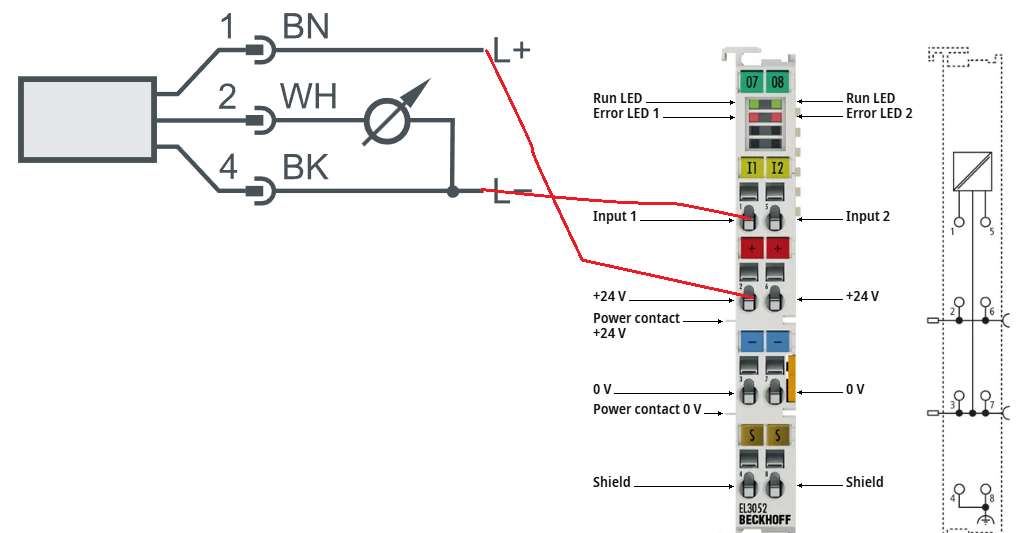
Figure 7: Beckhoff EL3052 IO card connected to real pressure sensor, Input 1 provides actual measured value (integer number)
4-20 mA Current Loop
References:
=> https://learn.adafruit.com/calibrating-sensors/two-point-calibration
=> https://www.azosensors.com/article.aspx?ArticleID=723
=> https://control.com/textbook/instrument-calibration/zero-and-span-adjustments-analog-instruments/
=> https://instrumentationtools.com/pressure-switch-calibration/
=> https://www.instrumentationtoolbox.com/2012/12/understanding-instrument-calibration.html
=> https://www.desmos.com/calculator/vwisv7snnd (online drawing tool)